Working with Azure Cloud. Likes cheese, chocolate and Burgdorfer Bier. Co-Organizer of Azure Bern User Group and Azure Bootcamp Switzerland
How to create a custom SCSM console task by using some SDK and XML magic
This blog post is should give you a overview of how to create your own custom Service Manager console task by using some C# and XML magic :-) My example task will show a computer’s IP address in a Popup form.
First of all, there are basically two different types of tasks in Service Manager. Travis Wright published a very good overview on Service Manager tasks in a blog post back in 2011. His post is a must-read before continuing with creating your own custom task. The post covers also some details about security and permissions when working with tasks.
…Working with Windows Azure Pack Service Management API: Creating new users
As you may already know, Windows Azure Pack is a collection of Windows Azure technologies, available for installation into your data center. It runs on top of Windows Server 2012 R2 and System Center 2012 R2 and enables you to offer a portal to your customers which is consistent with the public Windows Azure experience.
Windows Azure Pack provides a so called Service Management API which is a collection of REST APIs that provide extensibility for Service Management. So when it comes to using Windows Azure Pack in your datacenter, there is a good chance that the Windows Azure Pack Service Management API will eventually help you to automate some tasks :-)
…Quick Post: How to find Service Manager database server name in registry
Have you ever wondered how you can find the Service Manager database server which is used in your Service Manager environment? This can be done easily by querying the registry on one of your SCSM management servers.
The registry key HKEY_LOCAL_MACHINE/SOFTWARE/Microsoft/System Center/2010/Common/Database leads you to the corresponding values DatabaseName and DatabaseServerName
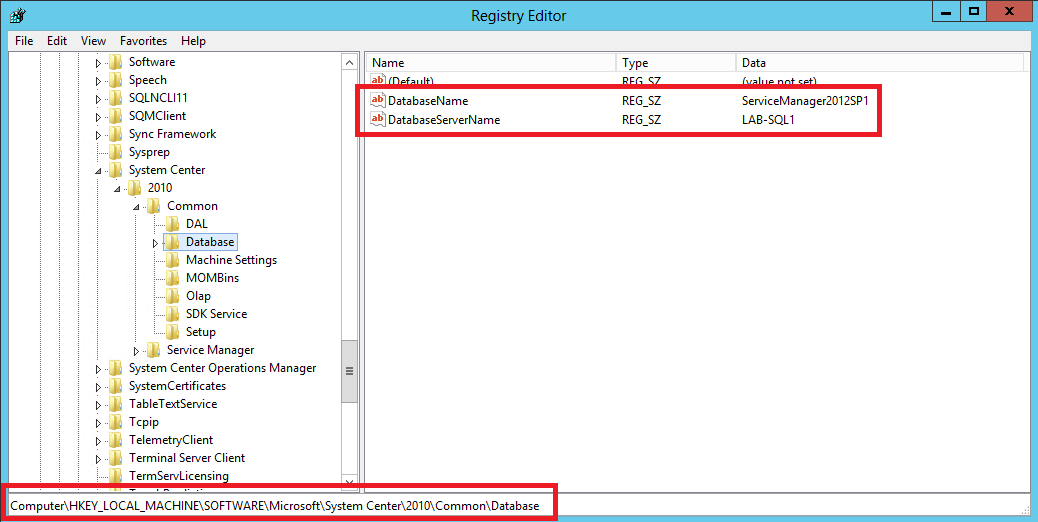
The same registry key found on the Data Warehouse Management Server contains the values for the corresponding Data Warehouse databases together with the DWH database server. Furthermore, the key HKEY_LOCAL_MACHINESOFTWARE/MicrosoftSystem Center2010/Common/Reporting contains the reporting server name as well as the web service URL.
SCORCH Web Console not accessible from another Active Directory forest
When I was working on a SCSM project for a customer, IT people were complaining that the Orchestrator Console was not accessible from their workstations. For some reasons they always got an error message from SCORCH when connecting to the Web Console. In this specific environment, Orchestrator was installed in a resource forest Active Directory environment. In a resource forest topology, one forest is dedicated to running server applications, such as Microsoft Exchange Server and in this case System Center components.
…Quick Post: Delete SCSM Work Items created before specific date with PowerShell
Based on a post by Pete Zerger on systemcentercentral.com I created a PowerShell command which deletes all Work Items of a specific class in your CMDB when created before a specific date.
    #Set date
    $BeforeDate = Get-Date("31/1/2013").ToString("MM/dd/yyy HH:mm:ss")
    #List incidents which were created before $BeforeDate
    Get-SCSMClassInstance -Class (Get-SCSMClass -Name System.WorkItem.Incident) | Where {($_.CreatedDate -lt $BeforeDate)} | sort-object CreatedDate | ft -Property Id,Title,CreatedDate
    #Remove instances
    Get-SCSMClassInstance -Class (Get-SCSMClass -Name System.WorkItem.Incident) | Where {($_.CreatedDate -lt $BeforeDate)} | Remove-SCSMClassInstance
The commands could probably be optimized by using the -Filter parameter instead of the Where clause.
…SLA icons & Service Level Target time not visible to members of scoped/restricted SCSM user roles
I recently wrote a post about how to create custom views with SLA icons and Service Level Target column. After writing this post I realized, that if a user is member of a scoped/restricted user role, he would not be able to see the SLA icons and Service Level Target times. I noticed that not only custom views are affected by this issue. This happens too for default SCSM views which display SLA icons and Service Level Target column, like the “Assigned To Me” view for Incidents as well as for Service Requests.
…SCSM Data Cubes outdated and MPSync Job fails for Cube Library Management Packs
As you probably know, you can do some pretty cool reporting stuff with Service Manager 2012 by using data cubes. Data cubes allow IT staff to get relevant information by using Excel to slice and dice data from SCSM data warehouse.
If you like to learn more about data cubes in Service Manager, check out this helpful series of blog posts by Marcel Zehner
However, lately I faced the problem that current data was missing. As you may have read in the above posts, there exist some data warehouse jobs which are responsible of processing these cubes regularly so that they contain current data.
…Installation of SCSM 2012 SP1 Update Rollup 2 fails
Since I always have some troubles installing Service Manager SP1 UR2 I decided to write a post on how to install Update Rollup 2 in case the installation fails with error occurred while executing custom action:_Installhealthserviceperfcountersforpatching
There already exist several posts on how to solve the problem, like the one from Thomas Ellerman. However, I wanted to document the solution once again for my personal use so I don’t have to look for it time and time again… ;-)
…Effective E-Mail Communication with Service Manager - Send Message from SCSM Console
Analysts working with Service Manager are sometimes facing problems when it comes down to communication with customers or endusers. Although Service Manager Exchange Connector does provide a simple solution for creating and updating tickets by e-mail, this does barley solve the problem from an analysts perspective.
Analysts often have to check with someone (mostly the affected user in case of incidents) to get all the information they need or to send instructions. It would be nice if they could do this directly from Service Manager console because switching between Service Manager console and Outlook every few minutes can be pretty painful…
…Create custom View with SLA icon and Service Level Target column
When working with SLA’s and Incidents it would be sometimes nice to have some visual aid to see if an Incident SLA is already breached or if everything is alright. Service Manager has some out of the box Incident as well as Service Request views which display a shiny icon if the SLA of the corresponding object is breached. In addition to the icon, there is also a column named Service Level Target, which displays date and time when the SLA will breach.
…