Working with Azure Cloud. Likes cheese, chocolate and Burgdorfer Bier. Co-Organizer of Azure Bern User Group and Azure Bootcamp Switzerland
Insert CI property values into Microsoft Word Template and print directly from Service Manager Console
I am always impressed how customizable SCSM can be. Lately I was working for a company who manages their users smartphones and SIM cards in SCSM. That’s already pretty cool but there is always some space for improvements :-) The company process of handing out a new phone together with a SIM card to an employee works as follows:
- An employee reports the need for a mobile phone to the IT department
- A new contract with one of Switzerlands major telecommunications provider will be closed for this employee.
- The new phone together with the SIM card is delivered to the IT department which creates a new record for them in SCSM
- IT department delivers the phone and SIM card together with a printed form to the employee who has to sign this form to confirm that he received the phone.
Now this all sounds pretty straightforward but when it comes to the last step of the above process there was a small drawback when handing out a printed form to the employee. Before switching to Service Manager for managing the phone assets, the IT company maintained a Microsoft Office Excel worksheet which contained all the phones and SIM cards. Pretty old-school you would say but it had one major advantage compared to Service Manager: They could easily print a form based on the information contained in the Excel worksheet and hand it out to the employee together with the phone.
…SCSM SP1 CU2 Installation Error _StoreActionsAccount
As I was installing CU2 lately on a SCSM management server of one of our customers I experienced a strange error. Since I did not find much about this error on the internet I wanted to share the error and solution in case anyone else came across the problem. I was able to successfully update the Data Warehouse management and Self-Service portal servers, without any issues. However, on the primary management server the update failed and provided the following error.
…Custom Task for printing labels with Brother P-Touch device directly from SCSM Console
Do you know these small Brother P-Touch devices with which you can print labels in quite every manner? These devices are pretty widespread in Switzerland and many IT departments use them to print labels which they stick on a device and contain serial number, IP address and/or other key facts of this specific device. A customer for which I am developing a small asset management extension for Service Manager is also using such a device.
…Install SCSM Exchange Connector in Resource Forest Environment
Lately I had to deal with a SCSM Exchange Connector Installation in a Resource Forest Active Directory environment. There was a AD forest which contained Exchange Server and the SCSM environment was placed in another forest. Between these two forests, a two-way trust was established.
Furthermore there was a requirement to setup two Exchange Connectors with two different mailboxes so that our customer was able to send messages to either a Incident or a Service Request mailbox. As we know, the Exchange connector always runs under the security context of the Workflow Run As Account. So to meet this criteria, I had to configure the Exchange connector to allow impersonation for other accounts. Otherwise the Workflow Run As Account can only access its own mailbox.
…How to Change SCSM Admin Group
Today I ran into a issue where I had to change the SCSM admin group defined at installation time. Since there was accidentally used a Active Directory global security group instead of a domain local security group when installing SCSM, I got curious if it is possible to change the group in SCSM configuration. Well, it is not that easy but there is a pretty handy way of changing the group by altering the SCSM database. Credits for this solution go to Dieter Gasser who published his findings on his blog.
…Debugging Custom SCSM Form in Visual Studio
Maybe some of you which sometimes have to create their custom forms for SCSM in Visual Studio were wondering too how to debug a custom form in case something is not working as it should. Which should not happen very often of course ;) However, it is pretty easy to debug your forms with Visual Studio by attaching the SCSM console to the Visual Studio debugger. Unfortunately, since the Visual Studio Authoring Extensions are not yet ready for Visual Studio 2012, I will write this post based on Visual Studio 2010. You can find some more information about debugging with Visual Studio 2010 on http://msdn.microsoft.com/en-us/library/sc65sadd
…Localizing/Changing SCSM Portal quick launch navigation links
In Switzerland a total of four languages are spoken. Beside German, Italian and French there is also a fourth language called Romansh (see also http://en.wikipedia.org/wiki/Romansh_language) which only a few people speak. However, because there are multiple languages spoken in Switzerland it is common that we have to localize System Center Service Manager portal. There are already many blog posts (including this one from Travis Wright http://blogs.technet.com/b/servicemanager/archive/2012/02/14/how-to-select-the-portal-language-in-scsm-2012.aspx) about localizing Sharepoint by installing the appropriate language packs. However, installing the language packs does not localize the navigation links like Help Articles, My Request and My Activities located in the quick launch section of the SCSM portal.
…How to create a new SCSM object from custom form
I recently had to create a custom form on which I had to place a button to create a new SCSM object. The goal of the form was that one could create a new Phone object directly by clicking a button on a custom Person object form. This may be not a common requirement but is pretty handy if you want to link an object with another one which does not yet exist.
…How to embed Files in Management Pack Bundle with Visual Studio Authoring Extensions (VSAE)
Recently I wrote a post about adding dll resource files to a Management Pack Bundle with Visual Studio Authoring Extensions (VSAE). Now this only works for .mp and .dll files. If you want to include for example an image file to your Management Pack Bundle which is going to be displayed as a Folder Icon, you first have to add the file to your Management Pack Project.
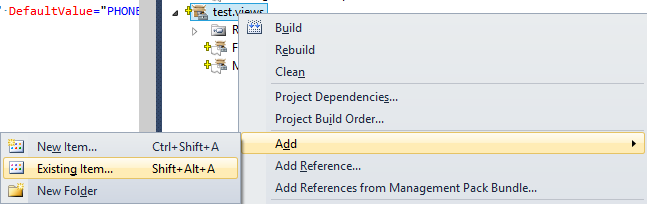
Now if you build your Management Pack Project the file is not yet included in the Management Pack Bundle. You have to change the Build Action property of the newly added file from _Content _to Embedded Resource to achieve this.
…How to add a button to edit ListView item on a custom SCSM form
I recently had to work with ListViews on custom forms to represent related CIs. While working on this, I was asked if it would be possible to edit objects in this ListView directly from the form by just selecting the object and then clicking on a button to open the form for this object. The result should look something like this.
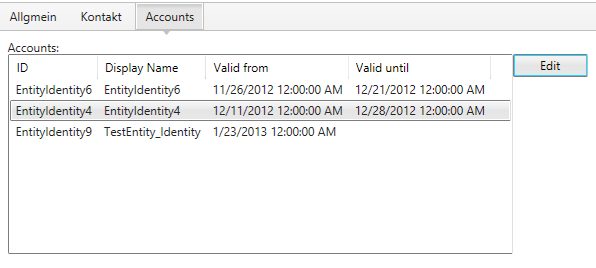
A click on the Edit button should open the form for the selected object
…